

Sensors and buttons
Addition to the system of descrete or measurement sensors connected to the terminal is carried out in the "Sensors and buttons" panel:
Folded panel contains information about the number of already connected sensors to the selected device. For addition or editing of a sensor deploy the panel:
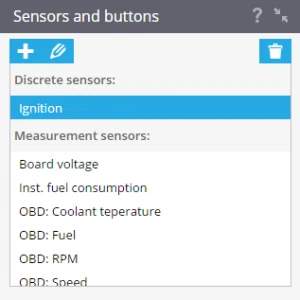
Possibility of connection of sensors, and also their quantity can vary depending on device model, for example for the A2 terminal there is a possibility of setting up the data that transmits through diagnostic OBD connector(as shown above).
Addition and editing of sensors is carried out by means of functional buttons:
 - add sensor
 - edit parameters of the selected sensor
 - delete the selected sensor
If you have more questions please contact our support team
In this section