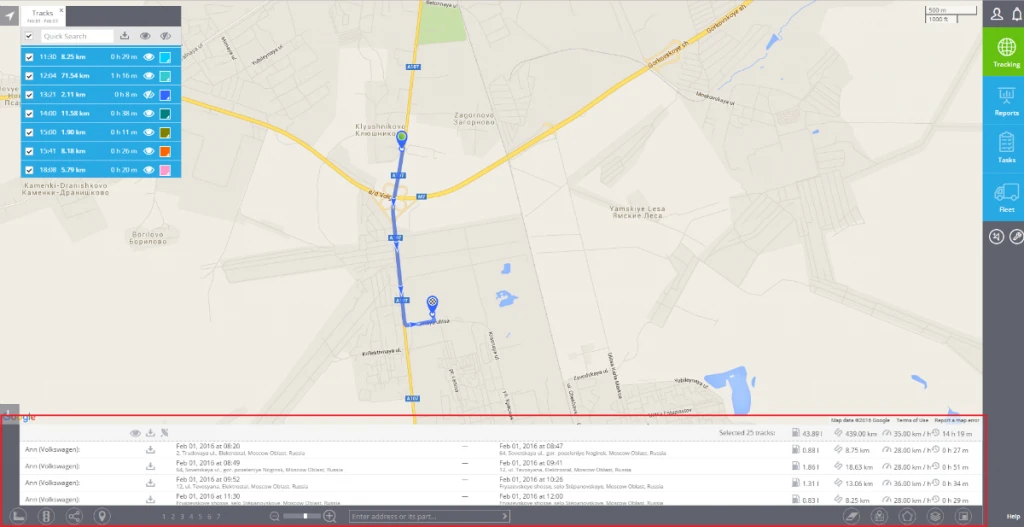

View tracks
You can retrieve track list and view those tracks on the map - for any date range under the limitation according to your tariff plan.
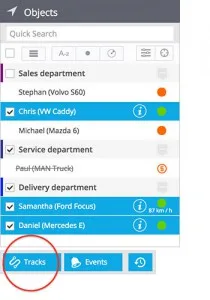
1. Select the required assets from objects list. You can take just one or mark multiple assets. You will see the Tracks button under the list. Click on this button.
2. Select the date/time range. You can also set other various parameters which influence the result and its viewing options:
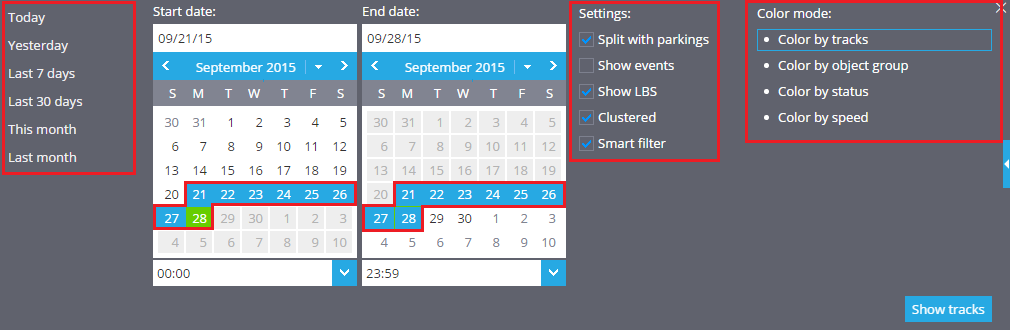
- Split with parkings - The whole track (i.e. the track of the day) can be split in trips for better view. The parking state is defined with Stay maximum speed and Stay minimum duration parameters, as configured by user in Devices app.
- Show events - Enable showing related events which have been logged. The rules for events can be configured in Rules app.
- Show LBS - Select whether you want locations defined by GSM and WiFi signals (less precise than satellite navigation) to be shown.
- Clustered - If this box is checked, the Interval and LBS locations with same coordinates and accuracy will be sticked together and shown as one clustered landmark.
- Smart filter - It filters out the most common inaccuracies caused by weak GPS signals, errors in LBS locations and others. The track looks better and more understandable to user. Normally it is recommended this checkbox to be enabled, but for tests and debug you can disable it.
- Color mode - Choose how you want your tracks to be colored. This option allows you to draw multiple tracks and compare them without getting confused.
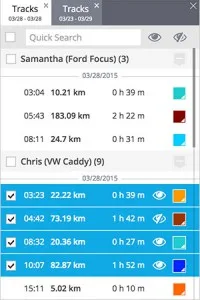
3. Click Show tracks button. You will see the tracks list with brief details. By clicking on the View icon you can draw any selected track(s), change its colour, etc. Each result is shown in a separate tab, so you can view tracks for different assets and dates at once.
4. Detailed track information will be shown in the bottom of the screen under "i" icon. If you selected multiple tracks, there will be also summary information.