
Ways of Identification
Automatic Identification
Electronic keys such as i-Button or RFID will help you to assign drivers to vehicles automatically. This functionality is supported only by those devices which have the ability to connect an electronic key via the 1-Wire interface.
In order to bind an i-Button key to a driver, you should manually enter the Hardware key to the required field in the employee card (the code is on the key itself).
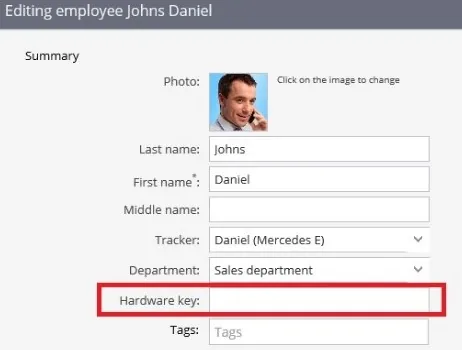
After the electronic key is inserted into the card and attached to the I-Button reader, the driver will be automatically identified by the system and assigned to the appropriate vehicle.
Manual identification
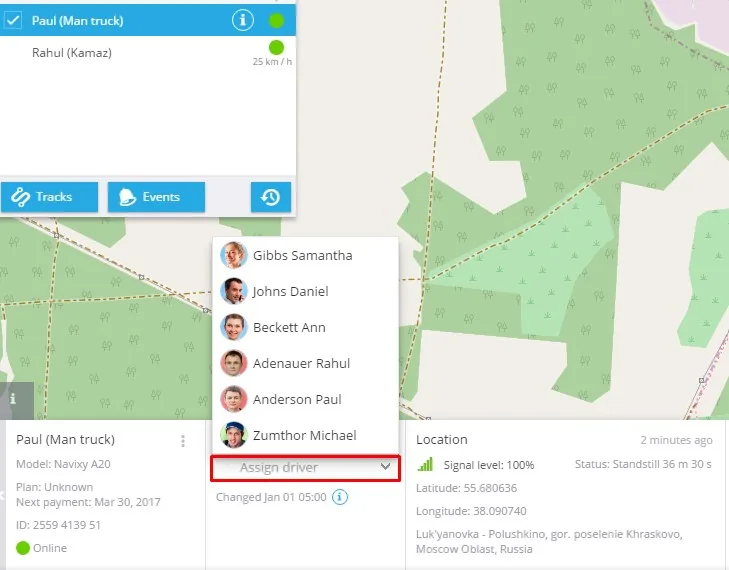
After the employee cards are created, it will be possible to assign drivers to cars. In the Monitoring app choose one object and assign a driver to the object in the widget bar below the screen as it is shown in the screenshot.